
Grok Bot Now Works With Your Phone Apps
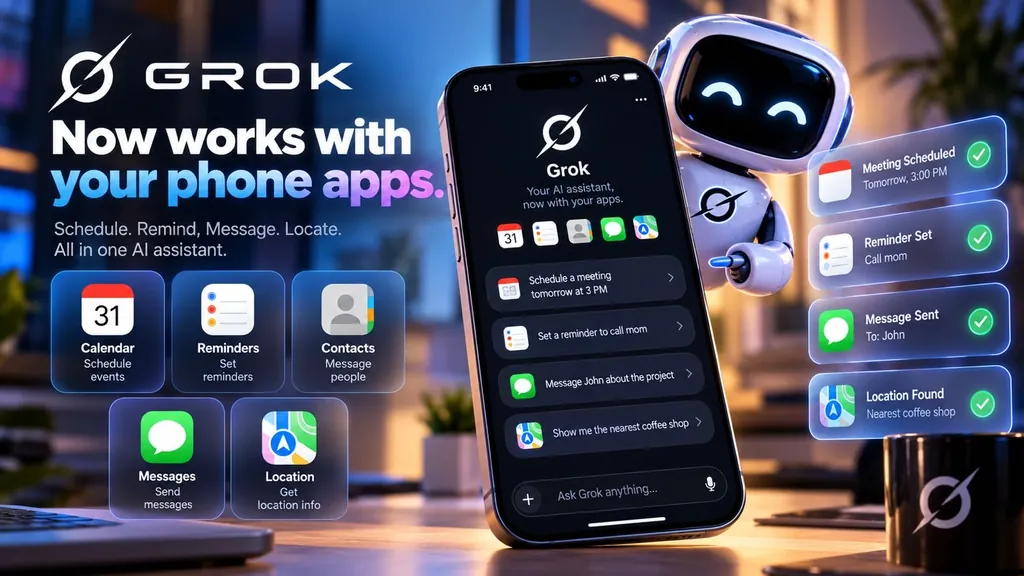
Yes. On October 22, 2026, the official @bot account said Grok Bot can now use Calendar, Reminders, Contacts and more apps on your phone, rolling out on iOS and Android. Its launch image also lists Messages, Location and Home, each with its own Allow button. iMessage is not part of this update.
Until now, your Grok Bot mostly reached your life through accounts you connected, like email. This update lets it work with the apps on your phone. Below is what each app can do according to the sources, what is not confirmed yet, and how to use it safely at home.
What @bot announced about Grok phone apps
On October 22, 2026 at 6:14 PM ET, the official Grok Bot account posted: “Grok Bot can now use Calendar, Reminders, Contacts, and more apps on your phone. Rolling out now on iOS and Android.” (@bot’s post) Elon Musk quoted it the same evening: “Grok Bot now integrates with your phone apps” (his post). Tesla North also reported that on October 22 Grok Bot gained access to your phone’s Calendar, Reminders and Contacts.
The post’s launch image shows six apps, each with its own Allow button and a one-line description:
| App | Launch image says | Status |
|---|---|---|
| Calendar | See your day and add events | Confirmed |
| Reminders | Set and check reminders | Confirmed |
| Contacts | Find and add contacts | Confirmed |
| Messages | Read and send messages | Listed. iMessage is not part of this update |
| Location | Find places near you | Listed in the launch image |
| Home | Control lights, locks and more | Listed in the launch image |
Which phones: the announcement says iOS and Android. It does not say whether each app works the same way on both, or which plans and countries get it first.
Grok Bot calendar: see your day and add events
Confirmed: Calendar is named in the @bot announcement, and the launch image describes it as “See your day and add events.” Tesla North reported the same Calendar access.
Example request: “Add soccer practice to my calendar every Tuesday at 5:30 PM, and tell me what else is on that evening.”
Grok Bot reminders: set and check reminders
Confirmed: Reminders is named in the @bot announcement, described as “Set and check reminders.” The official changelog also notes that the time zone the Bot uses for schedules and reminders updates when you message it from another time zone, unless you chose one under Timezone in Settings.
Example request: “Remind me to call Mom on Sunday at 4 PM.”
Grok Bot contacts: find and add contacts
Confirmed: Contacts is named in the @bot announcement, described as “Find and add contacts.” Tesla North noted that address-book access pairs with Grok Bot’s new phone calls feature, since the Bot can look up who to call.
Example request: “Find the number for our pediatrician in my contacts.”
Messages and texting: what is confirmed
Listed: the launch image shows a Messages app described as “Read and send messages.”
iMessage: when someone asked whether iMessage is included, @bot replied: “iMessage is not part of this update.” (@bot’s reply)
Not confirmed yet: which messaging service the Messages permission uses, whether Grok Bot can send texts through your iPhone’s Messages app, and how it works on Android. We will update this page when an official source says more.
Grok Bot location: find places near you
Listed: the launch image shows Location described as “Find places near you,” with its own Allow button.
Not confirmed yet: anything beyond finding nearby places, such as tracking where you are over time or sharing your location with others.
Example request: “Find the nearest pharmacy that’s open now.”
Family examples: Grok Bot iPhone apps and Android apps at home
Examples only. They show the kind of thing you can ask, using apps the announcement names. Results depend on which apps you allow.
- Example: “Put soccer practice on the family calendar for Tuesdays and Thursdays this month.”
- Example: “Remind me to call Mom on Sunday afternoon.”
- Example: “Where’s the nearest pharmacy?”
- Example: “Add the new babysitter to my contacts.”
- Example: “What’s on my calendar tomorrow before school pickup?”
Want a reminder like this every week? Ask for a routine, a job Grok Bot repeats for you. Prefer talking to typing? Our Hey Grok on iPhone guide shows how to open Grok Bot hands-free.
Privacy and safety: you choose what it can use
- One Allow per app. In the launch image, each app has its own Allow button, so you can turn on Calendar and Reminders without turning on Messages.
- It asks before acting. The official changelog (October 11, 2026) says: “Before an action it can’t undo, such as sending, posting, buying, or deleting, a Bot checks your own messages for approval.”
- Start small. Allow only the apps you need. You can add more later.
- Not confirmed yet: where phone data is processed, and how long it is kept. The announcement didn’t say.
Troubleshooting Grok Bot phone apps
I don’t see the phone apps yet
@bot said it is “rolling out now,” so it may not reach every phone at once. Keep your Grok Bot app up to date and check again later.
The bot can’t see my calendar, reminders or contacts
Each app needs its own Allow. If you skipped one, the bot can’t use it. Ask your bot which phone apps it can use right now. Grok Bot 101 says: “If you are wondering whether you can do something, ask.”
My iMessages don’t work
That matches what @bot said: “iMessage is not part of this update.”
A reminder came at the wrong time
Check your time zone. The changelog says the Bot updates the time zone it uses for schedules and reminders when you message it from another zone, unless you chose one under Timezone in Settings.
Grok phone apps FAQ
Can Grok Bot use my phone’s calendar?
Yes. The official @bot account said on October 22, 2026 that Grok Bot can now use Calendar on your phone. The launch image describes it as “See your day and add events.”
Can Grok Bot set reminders on my phone?
Yes. Reminders is one of the apps named in the @bot announcement. The launch image describes it as “Set and check reminders.”
Can Grok Bot use my contacts?
Yes. Contacts is named in the @bot announcement. The launch image describes it as “Find and add contacts.”
Can Grok Bot send texts or iMessages for me?
Not confirmed yet. The launch image lists a Messages app with “Read and send messages,” but the @bot account replied that “iMessage is not part of this update.” Which messaging services it covers, and on which phones, is not confirmed yet.
Can Grok Bot see my location?
The launch image lists Location as “Find places near you,” with its own Allow button. Details beyond that, such as whether it tracks or shares your location, are not confirmed yet.
Does it work on iPhone and Android?
The @bot announcement says it is “rolling out now on iOS and Android.” It does not say whether every app works the same way on both.
Why don’t I see it yet?
It is a rollout, so it may not reach everyone at the same time. The announcement did not say which plans or countries get it first.
Will Grok Bot send a message without asking me?
The official changelog says that before an action it can’t undo, such as sending, posting, buying, or deleting, a Bot checks your own messages for approval. In the launch image, each phone app also has its own Allow button.
Is this the same as Grok on my phone?
This feature is part of Grok Bot. The graphic at the top of this page says “Grok,” but the announcement came from the official Grok Bot account (@bot) and is about Grok Bot.
Updates
- Oct 22, 2026, 6:14 PM ET: @bot announces Calendar, Reminders, Contacts and more phone apps, rolling out on iOS and Android. Source
- Oct 22, 2026, 9:34 PM ET: Elon Musk quotes it: “Grok Bot now integrates with your phone apps.” Source
- Oct 22, 2026, 9:41 PM ET: @bot replies that iMessage is not part of this update. Source
- Oct 25, 2026: Tesla North reports the October 22 Calendar, Reminders and Contacts access. This page published. As of today, the official changelog’s October 22 and 23 entries do not list the phone apps. Source
You need your own Grok Bot plan from xAI (see x.ai/bot). The Butler is an independent guide publisher, not affiliated with xAI, SpaceX, X, Apple, or Google.
Sources
- @bot on X, Oct 22, 2026: “Grok Bot can now use Calendar, Reminders, Contacts, and more apps on your phone. Rolling out now on iOS and Android.”
- @bot launch image: Messages, Location, Calendar, Home, Reminders, Contacts, each with Allow
- @bot reply, Oct 22, 2026: “iMessage is not part of this update.”
- Elon Musk on X, Oct 22, 2026: “Grok Bot now integrates with your phone apps”
- Tesla North, Oct 25, 2026: Calendar, Reminders and Contacts access from Oct 22
- Grok Bot changelog (x.ai): approval before sending, posting, buying or deleting; time zones for reminders
- Grok Bot 101 (xAI guide)